WhatsApp AI Client Booking for Law Firms & Consultants
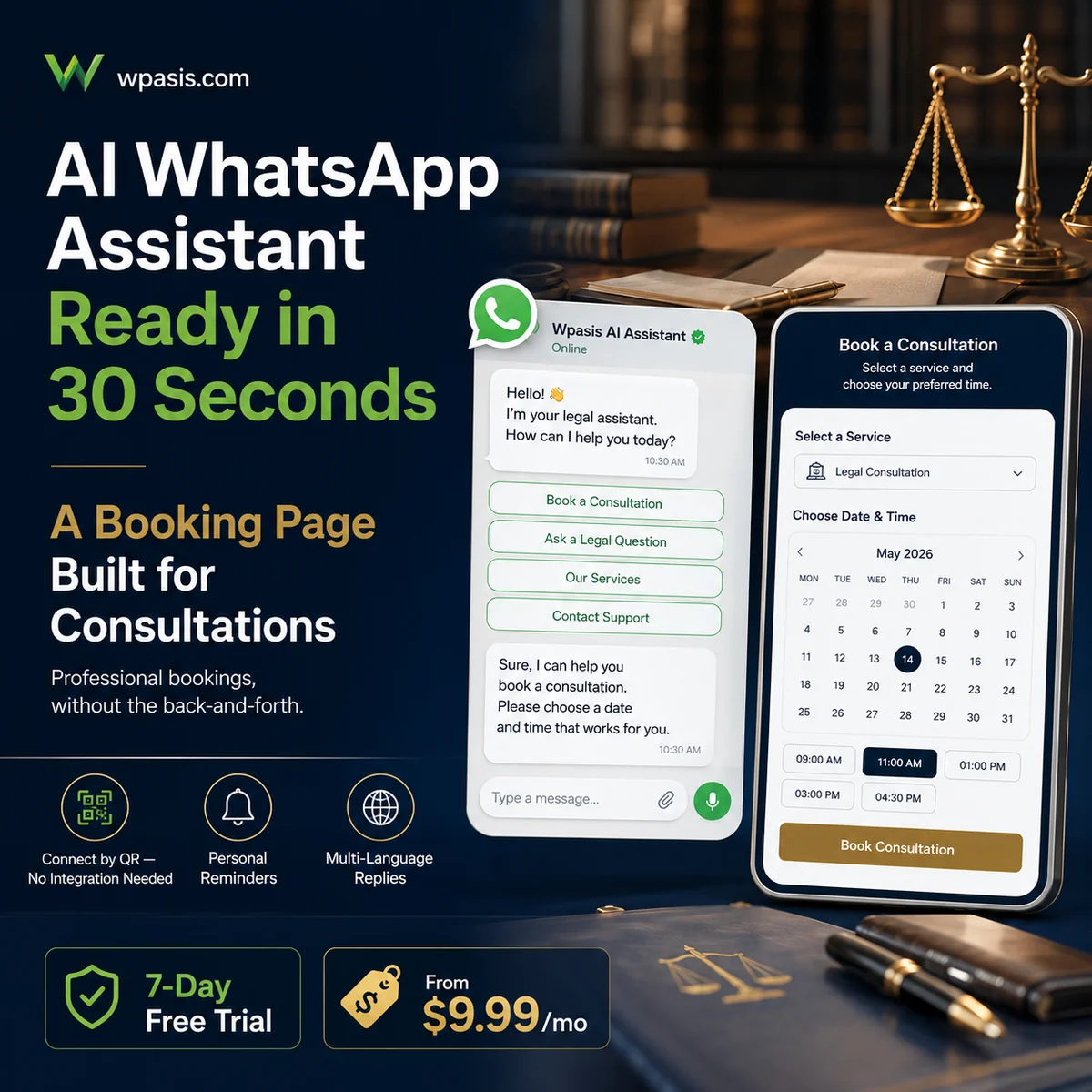
WpAsis is a WhatsApp AI-powered client booking system for law firms, financial advisors, management consultants, and professional service providers. It automates consultation scheduling, sends meeting reminders, manages multiple advisors' calendars, and handles rescheduling requests — all through WhatsApp, 24/7. At $9.99/month with a 7-day free trial, it's the professional booking layer that small and mid-sized practices can't justify hiring a full-time receptionist for.
How Poor Scheduling Infrastructure Costs Professional Practices
In professional services — law, accounting, consulting, financial advisory — your product is expert time. The unit economics are straightforward: billable hours multiplied by your rate equals revenue. Everything that reduces billable hours or increases non-billable administrative time directly attacks your business's profitability.
Scheduling is one of the largest sources of non-billable time in small professional practices. Partners and senior advisors answer their own phones, personally respond to WhatsApp messages from prospective clients, coordinate across team calendars to find meeting times, and follow up on confirmations. A senior lawyer billing $200/hour who spends 45 minutes per day on scheduling coordination is losing $150/day, $3,000/month in potential billing. Even at lower billing rates, the math is damaging.
The client experience problem is equally significant. When a potential client reaches out — often in a moment of genuine need (legal trouble, financial complexity, business crisis) — the speed and professionalism of the initial response sets the tone for the entire engagement. If their WhatsApp message sits unanswered for 4 hours because everyone is in consultations, they've already called another firm. You don't just lose a consultation booking — you lose a potentially long-term client relationship worth thousands of dollars.
Confidentiality and professionalism concerns make this more complex for legal practices. A WhatsApp message asking for a consultation on a sensitive matter needs to be handled with discretion. The response needs to be professional and appropriately measured — neither too casual nor too cold. Getting this tone right consistently across all staff members, at all hours, is difficult without systems in place.
For consulting practices operating across time zones — common for strategy consultants, financial advisors, and business coaches — after-hours availability becomes critical. Clients in different geographies need to book at times that work for their schedule, which may fall entirely outside your office hours.
Protect Billable Time with Professional Booking Automation
WpAsis positions your WhatsApp Business number as a professional, always-available client intake channel. When a prospective client messages about scheduling a consultation, the AI responds promptly, professionally, and helpfully — presenting available consultation types and times, collecting basic contact information, confirming the booking, and sending a calendar invitation and meeting confirmation.
The system is designed for the professional services context. Consultation types can be configured with appropriate names (Initial Consultation, Follow-up Advisory Session, Document Review Meeting), durations that reflect the actual complexity of each type, and any preparation instructions ("Please bring all relevant correspondence" or "We'll send a client questionnaire to complete before the meeting").
For multi-advisor practices, each professional is listed with their specializations. A prospective client with a contract dispute can be directed to the commercial litigation specialist; one with an estate planning question to the appropriate advisor. The AI handles this routing based on the inquiry context and each advisor's availability — without the delay of a human gatekeeping the conversation.
The reminder and confirmation system is particularly valuable for professional consultations, which clients sometimes book weeks in advance and then lose in the fog of busy schedules. An automated reminder 48 hours before a consultation — "Your appointment with [Advisor Name] is confirmed for Thursday at 3 PM. Please reply CONFIRM or call [number] to reschedule" — reduces missed appointments and allows sufficient notice to fill the slot if rescheduling is needed.
Industry Insight: Professional service firms report that 25–35% of new client inquiries arrive outside business hours, and practices with automated inquiry response systems convert those inquiries at 3–4× the rate of firms that respond only the following business day.
Source: Professional services client acquisition benchmarks
How WpAsis Works for Law & Consulting Firms
Connect your firm's WhatsApp Business number, configure your consultation types, and add your team. WpAsis manages the scheduling conversation professionally and routes confirmed appointments to the correct advisor — all automatically.
- Consultation type management: Define each type of meeting with appropriate duration, preparation instructions, and advisor assignment rules.
- Advisor-specific scheduling: Each team member has their own availability calendar; clients can be matched to the right specialist based on inquiry topic.
- Professional tone AI: The AI maintains the professional, measured communication style appropriate for legal and advisory contexts.
- Intake information collection: The AI can collect basic case or inquiry information before confirming — helping advisors prepare for initial consultations.
- Automated confirmation and reminders: Booking confirmations and pre-meeting reminders sent automatically via WhatsApp, reducing no-shows for high-value consultation slots.
Professional Practice Benefits Comparison
| Feature | Manual Management | With WpAsis |
|---|---|---|
| Inquiry response | Hours (or next day) | Instant, 24/7 |
| Scheduling admin time | 30–60 min/day | Under 5 min/day |
| Meeting reminders | None or manual | Automatic WhatsApp |
| No-show rate | 10–20% | Under 5% |
| Setup time | — | 30 minutes |
How to Set Up WpAsis for Your Practice (Step-by-Step)
- Step 1 — Create Account: Register at wpasis.com. Your 7-day free trial begins immediately — no credit card required.
- Step 2 — Connect WhatsApp: Link your firm's WhatsApp Business number via QR code scan in under 2 minutes.
- Step 3 — Choose Your Sector Template: Select the Law & Professional Consulting template. Pre-loaded consultation types (Initial Consultation, Follow-up Meeting, Document Review, Strategy Session) provide a professional starting framework.
- Step 4 — Add Your Team: Create profiles for each advisor or attorney with their practice areas and availability. The AI uses this to route inquiries appropriately.
- Step 5 — Customize AI Responses: Configure your firm's name, office location, any intake questions the AI should ask, and your cancellation policy. For legal practices, ensure the AI's responses include appropriate disclaimers if required by your jurisdiction.
- Step 6 — Go Live: Add your WhatsApp number to your website, LinkedIn profile, and Google Business profile. All consultation inquiries are now handled immediately and professionally.
For more on WhatsApp Business API capabilities, visit the official WhatsApp Business page.
Frequently Asked Questions
Is WhatsApp booking appropriate for a law firm from a confidentiality standpoint?
WpAsis manages scheduling and basic intake — it does not handle confidential case information. The AI collects names, contact details, and a brief description of the consultation topic (no different from what a receptionist would take). Sensitive case details are discussed in the actual consultation, not the booking conversation. WhatsApp end-to-end encryption provides reasonable security for this level of communication.
Can different attorneys be assigned to different practice areas in WpAsis?
Yes. Each attorney is configured as a staff member with their practice area specialization. When a client inquires about, for example, employment law, the AI can route the booking to attorneys with that specialization and present their available times — without exposing the full firm calendar to the client.
How does WpAsis handle prospective clients who are clearly in urgent need?
You can configure urgent inquiry keywords ("urgent", "court date", "deadline", "emergency") to trigger immediate staff notification rather than the standard booking flow. This ensures that truly time-sensitive inquiries receive immediate human attention while routine booking requests are handled automatically.
Can WpAsis be used for online video consultations as well as in-person meetings?
Yes. You can configure both in-person and video consultation types. For video sessions, you can include instructions for the meeting platform (Zoom, Teams, Google Meet) in the confirmation message, including a meeting link or instructions for how the link will be sent before the meeting.
What if a client wants to book with a specific attorney they've worked with before?
Returning clients who have an established relationship with a specific attorney can request that attorney by name. The AI recognizes the name, checks that attorney's availability, and books accordingly. If the requested attorney isn't available at the client's preferred time, the AI presents the nearest available slot with that person — maintaining the client relationship continuity that professional services depend on.
Protecting Attorney Time While Improving Client Access
Attorney time is the core product of a law firm, and every minute spent on scheduling logistics is a minute not spent on billable work. Studies of law firm operations consistently find that legal professionals spend 20–30 minutes per day on scheduling-related communication — a seemingly small number that adds up to more than 80 billable hours lost per attorney per year. WhatsApp AI reclaims this time completely by handling all appointment communication autonomously, from initial inquiry through confirmation and reminder.
At the same time, clients increasingly expect responsive, accessible service. Potential clients researching legal representation often contact multiple firms simultaneously and choose the one that responds first. A firm whose WhatsApp AI responds to an inquiry at 10pm on a Sunday, asks the right intake questions, and offers available consultation slots immediately has a decisive competitive advantage over firms whose first response comes the next business day. Speed of response is a measurable factor in consultation conversion rates, and AI eliminates any delay in that critical first contact.
For solo practitioners and small firms where the attorney is also the administrator, this automation is transformative. A solo family law attorney or independent consultant can appear as responsive and professionally organized as a much larger firm, because the AI handles all the communication infrastructure that would otherwise require a dedicated support staff member.
Conflict Checks, Intake Forms, and Pre-Consultation Preparation
Legal intake is more complex than appointment booking in most other sectors. Before confirming a consultation, many firms need to run a conflict-of-interest check, verify that the matter falls within the firm's practice areas, and collect enough information to ensure the consultation will be productive. WhatsApp AI can be configured to handle this structured intake workflow conversationally.
When a prospective client messages to request a consultation, the AI asks guided questions: nature of the legal matter, other parties involved, jurisdiction, and urgency. This information is collected and structured for the attorney or intake coordinator to review before confirming the appointment. If the matter involves a potential conflict, the firm can flag the inquiry before the consultation is booked, saving both parties the time of a meeting that cannot lead to representation.
Pre-consultation document collection is another valuable feature. The AI can send a secure link requesting relevant documents — contracts, correspondence, prior agreements — so the attorney can review them before the meeting. When clients arrive prepared and the attorney has already reviewed key documents, consultation time is used more efficiently, leading to better client experiences and more productive billable engagements.
Frequently Asked Questions
Can the system keep client communication records for legal compliance purposes?
Yes. All WhatsApp conversations handled through a properly configured AI booking system are logged and stored with timestamps, providing a complete record of client communication. These logs can be exported for file documentation, reviewed in the event of a dispute, or used to demonstrate client-authorized consent for specific actions. For firms subject to professional responsibility rules regarding client communication records, this automated documentation is a significant compliance benefit.
How does the AI handle urgent matters that cannot wait for a scheduled consultation?
The system can be configured to recognize urgency indicators — language suggesting immediate legal deadlines, custody emergencies, arrest situations, or other time-sensitive matters — and respond with expedited options rather than standard scheduling. It can provide an emergency contact number, offer same-day consultation slots if available, or route the inquiry to an on-call attorney. The response protocol for urgent matters is fully customizable based on the firm's practice areas and emergency availability.
Is it appropriate for a law firm to use AI for client communications given confidentiality obligations?
This is a legitimate and important question. WhatsApp AI used for scheduling and intake does not require sharing privileged information — it collects administrative details needed to book and prepare for a consultation. The AI operates as a scheduling tool, not a legal advisor. Attorney-client privilege attaches to communications with the attorney, not to appointment logistics. Firms should review their jurisdiction's professional responsibility guidance, but scheduling automation is widely adopted in the legal industry and well within standard professional conduct boundaries.
Start Your Free Trial Today
7 days free, no credit card required. Set up your AI client booking assistant for your practice in 30 minutes and protect your billable time from scheduling overhead.
Get Started Free